Experiments via SDK
Experiments via SDK are used to programmatically loop your applications or prompts through a dataset and optionally apply Evaluation Methods to the results. You can use a dataset hosted on Langfuse or a local dataset as the foundation for your experiment.
See also the JS/TS SDK reference and the Python SDK reference for more details on running experiments via the SDK.
Why use Experiments via SDK?
- Full flexibility to use your own application logic
- Use custom scoring functions to evaluate the outputs of a single item and the full run
- Run multiple experiments on the same dataset in parallel
- Easy to integrate with your existing evaluation infrastructure
Experiment runner SDK
Both the Python and JS/TS SDKs provide a high-level abstraction for running an experiment on a dataset. The dataset can be both local or hosted on Langfuse. Using the Experiment runner is the recommended way to run an experiment on a dataset with our SDK.
The experiment runner automatically handles:
- Concurrent execution of tasks with configurable limits
- Automatic tracing of all executions for observability
- Flexible evaluation with both item-level and run-level evaluators
- Error isolation so individual failures don't stop the experiment
- Dataset integration for easy comparison and tracking
The experiment runner SDK supports both datasets hosted on Langfuse and datasets hosted locally. If you are using a dataset hosted on Langfuse for your experiment, the SDK will automatically create a dataset run for you that you can inspect and compare in the Langfuse UI. For locally hosted datasets not on Langfuse, only traces and scores (if evaluations are used) are tracked in Langfuse.
Basic Usage
Start with the simplest possible experiment to test your task function on local data. If you already have a dataset in Langfuse, see here.
from langfuse import get_client
from langfuse.openai import OpenAI

# Initialize client
langfuse = get_client()

# Define your task function
def my_task(*, item, **kwargs):
    question = item["input"]
    response = OpenAI().chat.completions.create(
        model="gpt-4.1", messages=[{"role": "user", "content": question}]
    )

    return response.choices[0].message.content


# Run experiment on local data
local_data = [
    {"input": "What is the capital of France?", "expected_output": "Paris"},
    {"input": "What is the capital of Germany?", "expected_output": "Berlin"},
]

result = langfuse.run_experiment(
    name="Geography Quiz",
    description="Testing basic functionality",
    data=local_data,
    task=my_task,
)

# Use format method to display results
print(result.format())
Make sure that OpenTelemetry is properly set up for traces to be delivered to Langfuse. See the tracing setup documentation for configuration details. Always flush the span processor at the end of execution to ensure all traces are sent.
import { OpenAI } from "openai";
import { NodeSDK } from "@opentelemetry/sdk-node";

import {
  LangfuseClient,
  ExperimentTask,
  ExperimentItem,
} from "@langfuse/client";
import { observeOpenAI } from "@langfuse/openai";
import { LangfuseSpanProcessor } from "@langfuse/otel";

// Initialize OpenTelemetry
const otelSdk = new NodeSDK({ spanProcessors: [new LangfuseSpanProcessor()] });
otelSdk.start();

// Initialize client
const langfuse = new LangfuseClient();

// Run experiment on local data
const localData: ExperimentItem[] = [
  { input: "What is the capital of France?", expectedOutput: "Paris" },
  { input: "What is the capital of Germany?", expectedOutput: "Berlin" },
];

// Define your task function
const myTask: ExperimentTask = async (item) => {
  const question = item.input;

  const response = await observeOpenAI(new OpenAI()).chat.completions.create({
    model: "gpt-4.1",
    messages: [
      {
        role: "user",
        content: question,
      },
    ],
  });

  return response;
};

// Run the experiment
const result = await langfuse.experiment.run({
  name: "Geography Quiz",
  description: "Testing basic functionality",
  data: localData,
  task: myTask,
});

// Print formatted result
console.log(await result.format());

// Important: shut down OTEL SDK to deliver traces
await otelSdk.shutdown();
Note for JS/TS SDK: OpenTelemetry must be properly set up for traces to be delivered to Langfuse. See the tracing setup documentation for configuration details. Always flush the span processor at the end of execution to ensure all traces are sent.
When running experiments on local data, only traces are created in Langfuse - no dataset runs are generated. Each task execution creates an individual trace for observability and debugging.
Usage with Langfuse Datasets
Run experiments directly on datasets stored in Langfuse for automatic tracing and comparison.
from langfuse import get_client
from langfuse.openai import OpenAI

# Initialize client
langfuse = get_client()

# Define your task function
def my_task(*, item, **kwargs):
    question = item.input # `run_experiment` passes a `DatasetItem` to the task function. The input of the dataset item is available as `item.input`.
    response = OpenAI().chat.completions.create(
        model="gpt-4.1", messages=[{"role": "user", "content": question}]
    )

    return response.choices[0].message.content

# Get dataset from Langfuse
dataset = langfuse.get_dataset("my-evaluation-dataset")

# Run experiment directly on the dataset
result = dataset.run_experiment(
    name="Production Model Test",
    description="Monthly evaluation of our production model",
    task=my_task # see above for the task definition
)

# Use format method to display results
print(result.format())
// Get dataset from Langfuse
const dataset = await langfuse.dataset.get("my-evaluation-dataset");
// Run experiment directly on the dataset
const result = await dataset.runExperiment({
name: "Production Model Test",
description: "Monthly evaluation of our production model",
task: myTask, // see above for the task definition
});
// Use format method to display results
console.log(await result.format());
// Important: shut down OpenTelemetry to ensure traces are sent to Langfuse
await otelSdk.shutdown();When using Langfuse datasets, dataset runs are automatically created in Langfuse and are available for comparison in the UI. This enables tracking experiment performance over time and comparing different approaches on the same dataset.
Experiments always run on the latest dataset version at experiment time. Support for running experiments on specific dataset versions will be added to the SDK shortly.
Advanced Features
Enhance your experiments with evaluators and advanced configuration options.
Evaluators
Evaluators assess the quality of task outputs at the item level. They receive the input, metadata, output, and expected output for each item and return evaluation metrics that are reported as scores on the traces in Langfuse.
from langfuse import Evaluation

# Define evaluation functions
def accuracy_evaluator(*, input, output, expected_output, metadata, **kwargs):
    if expected_output and expected_output.lower() in output.lower():
        return Evaluation(name="accuracy", value=1.0, comment="Correct answer found")

    return Evaluation(name="accuracy", value=0.0, comment="Incorrect answer")

def length_evaluator(*, input, output, **kwargs):
    return Evaluation(name="response_length", value=len(output), comment=f"Response has {len(output)} characters")

# Use multiple evaluators
result = langfuse.run_experiment(
    name="Multi-metric Evaluation",
    data=test_data,
    task=my_task,
    evaluators=[accuracy_evaluator, length_evaluator]
)

print(result.format())
// Define evaluation functions
const accuracyEvaluator = async ({ input, output, expectedOutput }) => {
if (
expectedOutput &&
output.toLowerCase().includes(expectedOutput.toLowerCase())
) {
return {
name: "accuracy",
value: 1.0,
comment: "Correct answer found",
};
}
return {
name: "accuracy",
value: 0.0,
comment: "Incorrect answer",
};
};
const lengthEvaluator = async ({ input, output }) => {
return {
name: "response_length",
value: output.length,
comment: `Response has ${output.length} characters`,
};
};
// Use multiple evaluators
const result = await langfuse.experiment.run({
name: "Multi-metric Evaluation",
data: testData,
task: myTask,
evaluators: [accuracyEvaluator, lengthEvaluator],
});
console.log(await result.format());Run-level Evaluators
Run-level evaluators assess the full experiment results and compute aggregate metrics. When run on Langfuse datasets, these scores are attached to the full dataset run for tracking overall experiment performance.
from langfuse import Evaluation

def average_accuracy(*, item_results, **kwargs):
    """Calculate average accuracy across all items"""
    accuracies = [
        eval.value for result in item_results
        for eval in result.evaluations
        if eval.name == "accuracy"
    ]

    if not accuracies:
        return Evaluation(name="avg_accuracy", value=None)

    avg = sum(accuracies) / len(accuracies)

    return Evaluation(name="avg_accuracy", value=avg, comment=f"Average accuracy: {avg:.2%}")

result = langfuse.run_experiment(
    name="Comprehensive Analysis",
    data=test_data,
    task=my_task,
    evaluators=[accuracy_evaluator],
    run_evaluators=[average_accuracy]
)

print(result.format())
const averageAccuracy = async ({ itemResults }) => {
// Calculate average accuracy across all items
const accuracies = itemResults
.flatMap((result) => result.evaluations)
.filter((evaluation) => evaluation.name === "accuracy")
.map((evaluation) => evaluation.value as number);
if (accuracies.length === 0) {
return { name: "avg_accuracy", value: null };
}
const avg = accuracies.reduce((sum, val) => sum + val, 0) / accuracies.length;
return {
name: "avg_accuracy",
value: avg,
comment: `Average accuracy: ${(avg * 100).toFixed(1)}%`,
};
};
const result = await langfuse.experiment.run({
name: "Comprehensive Analysis",
data: testData,
task: myTask,
evaluators: [accuracyEvaluator],
runEvaluators: [averageAccuracy],
});
console.log(await result.format());Async Tasks and Evaluators
Both task functions and evaluators can be asynchronous.
import asyncio
from langfuse.openai import AsyncOpenAI

async def async_llm_task(*, item, **kwargs):
    """Async task using OpenAI"""
    client = AsyncOpenAI()
    response = await client.chat.completions.create(
        model="gpt-4",
        messages=[{"role": "user", "content": item["input"]}]
    )

    return response.choices[0].message.content

# Works seamlessly with async functions
result = langfuse.run_experiment(
    name="Async Experiment",
    data=test_data,
    task=async_llm_task,
    max_concurrency=5  # Control concurrent API calls
)

print(result.format())
import OpenAI from "openai";
const asyncLlmTask = async (item) => {
// Async task using OpenAI
const client = new OpenAI();
const response = await client.chat.completions.create({
model: "gpt-4",
messages: [{ role: "user", content: item.input }],
});
return response.choices[0].message.content;
};
// Works seamlessly with async functions
const result = await langfuse.experiment.run({
name: "Async Experiment",
data: testData,
task: asyncLlmTask,
maxConcurrency: 5, // Control concurrent API calls
});
console.log(await result.format());Configuration Options
Customize experiment behavior with various configuration options.
result = langfuse.run_experiment(
    name="Configurable Experiment",
    run_name="Custom Run Name", # will be dataset run name if dataset is used
    description="Experiment with custom configuration",
    data=test_data,
    task=my_task,
    evaluators=[accuracy_evaluator],
    run_evaluators=[average_accuracy],
    max_concurrency=10,  # Max concurrent executions
    metadata={  # Attached to all traces
        "model": "gpt-4",
        "temperature": 0.7,
        "version": "v1.2.0"
    }
)

print(result.format())
const result = await langfuse.experiment.run({
name: "Configurable Experiment",
runName: "Custom Run Name", // will be dataset run name if dataset is used
description: "Experiment with custom configuration",
data: testData,
task: myTask,
evaluators: [accuracyEvaluator],
runEvaluators: [averageAccuracy],
maxConcurrency: 10, // Max concurrent executions
metadata: {
// Attached to all traces
model: "gpt-4",
temperature: 0.7,
version: "v1.2.0",
},
});
console.log(await result.format());Testing in CI Environments
Integrate the experiment runner with testing frameworks like Pytest and Vitest to run automated evaluations in your CI pipeline. Use evaluators to create assertions that can fail tests based on evaluation results.
# test_geography_experiment.py
import pytest
from langfuse import get_client, Evaluation
from langfuse.openai import OpenAI

# Test data for European capitals
test_data = [
    {"input": "What is the capital of France?", "expected_output": "Paris"},
    {"input": "What is the capital of Germany?", "expected_output": "Berlin"},
    {"input": "What is the capital of Spain?", "expected_output": "Madrid"},
]

def geography_task(*, item, **kwargs):
    """Task function that answers geography questions"""
    question = item["input"]
    response = OpenAI().chat.completions.create(
        model="gpt-4",
        messages=[{"role": "user", "content": question}]
    )
    return response.choices[0].message.content

def accuracy_evaluator(*, input, output, expected_output, **kwargs):
    """Evaluator that checks if the expected answer is in the output"""
    if expected_output and expected_output.lower() in output.lower():
        return Evaluation(name="accuracy", value=1.0)

    return Evaluation(name="accuracy", value=0.0)

def average_accuracy_evaluator(*, item_results, **kwargs):
    """Run evaluator that calculates average accuracy across all items"""
    accuracies = [
        eval.value for result in item_results
        for eval in result.evaluations if eval.name == "accuracy"
    ]

    if not accuracies:
        return Evaluation(name="avg_accuracy", value=None)

    avg = sum(accuracies) / len(accuracies)

    return Evaluation(name="avg_accuracy", value=avg, comment=f"Average accuracy: {avg:.2%}")

@pytest.fixture
def langfuse_client():
    """Initialize Langfuse client for testing"""
    return get_client()

def test_geography_accuracy_passes(langfuse_client):
    """Test that passes when accuracy is above threshold"""
    result = langfuse_client.run_experiment(
        name="Geography Test - Should Pass",
        data=test_data,
        task=geography_task,
        evaluators=[accuracy_evaluator],
        run_evaluators=[average_accuracy_evaluator]
    )

    # Access the run evaluator result directly
    avg_accuracy = next(
        eval.value for eval in result.run_evaluations
        if eval.name == "avg_accuracy"
    )

    # Assert minimum accuracy threshold
    assert avg_accuracy >= 0.8, f"Average accuracy {avg_accuracy:.2f} below threshold 0.8"

def test_geography_accuracy_fails(langfuse_client):
    """Example test that demonstrates failure conditions"""
    # Use a weaker model or harder questions to demonstrate test failure
    def failing_task(*, item, **kwargs):
        # Simulate a task that gives wrong answers
        return "I don't know"

    result = langfuse_client.run_experiment(
        name="Geography Test - Should Fail",
        data=test_data,
        task=failing_task,
        evaluators=[accuracy_evaluator],
        run_evaluators=[average_accuracy_evaluator]
    )

    # Access the run evaluator result directly
    avg_accuracy = next(
        eval.value for eval in result.run_evaluations
        if eval.name == "avg_accuracy"
    )

    # This test will fail because the task gives wrong answers
    with pytest.raises(AssertionError):
        assert avg_accuracy >= 0.8, f"Expected test to fail with low accuracy: {avg_accuracy:.2f}"
// test/geography-experiment.test.ts
import { describe, it, expect, beforeAll, afterAll } from "vitest";
import { OpenAI } from "openai";
import { NodeSDK } from "@opentelemetry/sdk-node";
import { LangfuseClient, ExperimentItem } from "@langfuse/client";
import { observeOpenAI } from "@langfuse/openai";
import { LangfuseSpanProcessor } from "@langfuse/otel";
// Test data for European capitals
const testData: ExperimentItem[] = [
{ input: "What is the capital of France?", expectedOutput: "Paris" },
{ input: "What is the capital of Germany?", expectedOutput: "Berlin" },
{ input: "What is the capital of Spain?", expectedOutput: "Madrid" },
];
let otelSdk: NodeSDK;
let langfuse: LangfuseClient;
beforeAll(async () => {
// Initialize OpenTelemetry
otelSdk = new NodeSDK({ spanProcessors: [new LangfuseSpanProcessor()] });
otelSdk.start();
// Initialize Langfuse client
langfuse = new LangfuseClient();
});
afterAll(async () => {
// Clean shutdown
await otelSdk.shutdown();
});
const geographyTask = async (item: ExperimentItem) => {
const question = item.input;
const response = await observeOpenAI(new OpenAI()).chat.completions.create({
model: "gpt-4",
messages: [{ role: "user", content: question }],
});
return response.choices[0].message.content;
};
const accuracyEvaluator = async ({ input, output, expectedOutput }) => {
if (
expectedOutput &&
output.toLowerCase().includes(expectedOutput.toLowerCase())
) {
return { name: "accuracy", value: 1 };
}
return { name: "accuracy", value: 0 };
};
const averageAccuracyEvaluator = async ({ itemResults }) => {
// Calculate average accuracy across all items
const accuracies = itemResults
.flatMap((result) => result.evaluations)
.filter((evaluation) => evaluation.name === "accuracy")
.map((evaluation) => evaluation.value as number);
if (accuracies.length === 0) {
return { name: "avg_accuracy", value: null };
}
const avg = accuracies.reduce((sum, val) => sum + val, 0) / accuracies.length;
return {
name: "avg_accuracy",
value: avg,
comment: `Average accuracy: ${(avg * 100).toFixed(1)}%`,
};
};
describe("Geography Experiment Tests", () => {
it("should pass when accuracy is above threshold", async () => {
const result = await langfuse.experiment.run({
name: "Geography Test - Should Pass",
data: testData,
task: geographyTask,
evaluators: [accuracyEvaluator],
runEvaluators: [averageAccuracyEvaluator],
});
// Access the run evaluator result directly
const avgAccuracy = result.runEvaluations.find(
(eval) => eval.name === "avg_accuracy"
)?.value as number;
// Assert minimum accuracy threshold
expect(avgAccuracy).toBeGreaterThanOrEqual(0.8);
}, 30_000); // 30 second timeout for API calls
it("should fail when accuracy is below threshold", async () => {
// Task that gives wrong answers to demonstrate test failure
const failingTask = async (item: ExperimentItem) => {
return "I don't know";
};
const result = await langfuse.experiment.run({
name: "Geography Test - Should Fail",
data: testData,
task: failingTask,
evaluators: [accuracyEvaluator],
runEvaluators: [averageAccuracyEvaluator],
});
// Access the run evaluator result directly
const avgAccuracy = result.runEvaluations.find(
(eval) => eval.name === "avg_accuracy"
)?.value as number;
// This test will fail because the task gives wrong answers
expect(() => {
expect(avgAccuracy).toBeGreaterThanOrEqual(0.8);
}).toThrow();
}, 30_000);
});These examples show how to use the experiment runner's evaluation results to create meaningful test assertions in your CI pipeline. Tests can fail when accuracy drops below acceptable thresholds, ensuring model quality standards are maintained automatically.
Autoevals Integration
Access pre-built evaluation functions through the autoevals library integration.
The Python SDK supports AutoEvals evaluators through direct integration:
from langfuse.experiment import create_evaluator_from_autoevals
from autoevals.llm import Factuality

evaluator = create_evaluator_from_autoevals(Factuality())

result = langfuse.run_experiment(
    name="Autoevals Integration Test",
    data=test_data,
    task=my_task,
    evaluators=[evaluator]
)

print(result.format())
The JS SDK provides seamless integration with the AutoEvals library for pre-built evaluation functions:
import { Factuality, Levenshtein } from "autoevals";
import { createEvaluatorFromAutoevals } from "@langfuse/client";

// Convert AutoEvals evaluators to Langfuse-compatible format
const factualityEvaluator = createEvaluatorFromAutoevals(Factuality());
const levenshteinEvaluator = createEvaluatorFromAutoevals(Levenshtein());

// Use with additional parameters
const customFactualityEvaluator = createEvaluatorFromAutoevals(
  Factuality,
  { model: "gpt-4o" } // Additional AutoEvals parameters
);

const result = await langfuse.experiment.run({
  name: "AutoEvals Integration Test",
  data: testDataset,
  task: myTask,
  evaluators: [
    factualityEvaluator,
    levenshteinEvaluator,
    customFactualityEvaluator,
  ],
});

console.log(await result.format());
Low-level SDK methods
If you need more control over the dataset run, you can use the low-level SDK methods in order to loop through the dataset items and execute your application logic.
Load the dataset
Use the Python or JS/TS SDK to load the dataset.
from langfuse import get_client

dataset = get_client().get_dataset("<dataset_name>")
import { LangfuseClient } from "@langfuse/client";
const langfuse = new LangfuseClient();
const dataset = await langfuse.dataset.get("<dataset_name>");Instrument your application
First we create our application runner helper function. This function will be called for every dataset item in the next step. If you use Langfuse for production observability, you do not need to change your application code.
For a dataset run, it is important that your application creates Langfuse traces for each execution so they can be linked to the dataset item. Please refer to the integrations page for details on how to instrument the framework you are using.
Assume you already have a Langfuse-instrumented LLM-app:
from langfuse import get_client, observe
from langfuse.openai import OpenAI

@observe
def my_llm_function(question: str):
    response = OpenAI().chat.completions.create(
        model="gpt-4o", messages=[{"role": "user", "content": question}]
    )
    output = response.choices[0].message.content

    # Update observation input / output
    get_client().update_current_observation(input=question, output=output)

    return output
See Python SDK docs for more details.
Please make sure you have the Langfuse SDK set up for tracing of your application. If you use Langfuse for observability, this is the same setup.
Example:
import { OpenAI } from "openai"

import { LangfuseClient } from "@langfuse/client";
import { startActiveObservation } from "@langfuse/tracing";
import { observeOpenAI } from "@langfuse/openai";

const myLLMApplication = async (input: string) => {
  return startActiveObservation("my-llm-application", async (span) => {
    const output = await observeOpenAI(new OpenAI()).chat.completions.create({
      model: "gpt-4o",
      messages: [{ role: "user", content: input }],
    });

    span.update({ input, output: output.choices[0].message.content });

    // return reference to span and output
    // will be simplified in a future version of the SDK
    return [span, output] as const;
  }
};
from langchain_openai import ChatOpenAI
from langchain_core.prompts import ChatPromptTemplate
def my_langchain_chain(question, langfuse_handler):
llm = ChatOpenAI(model_name="gpt-4o")
prompt = ChatPromptTemplate.from_template("Answer the question: {question}")
chain = prompt | llm
response = chain.invoke(
{"question": question},
config={"callbacks": [langfuse_handler]})
return responseimport { CallbackHandler } from "@langfuse/langchain";
const myLLMApplication = async (input: string) => {
return startActiveObservation('my_llm_application', async (span) => {
// ... your Langchain code ...
const langfuseHandler = new CallbackHandler();
const output = await chain.invoke({ input }, { callbacks: [langfuseHandler] });
span.update({ input, output });
// return reference to span and output
// will be simplified in a future version of the SDK
return [span, output] as const;
}
}Please refer to the Vercel AI SDK docs for details on how to use the Vercel AI SDK with Langfuse.
const runMyLLMApplication = async (input: string, traceId: string) => {
  return startActiveObservation("my_llm_application", async (span) => {
    const output = await generateText({
      model: openai("gpt-4o"),
      maxTokens: 50,
      prompt: input,
      experimental_telemetry: {
        isEnabled: true,
        functionId: "vercel-ai-sdk-example-trace",
      },
    });

    span.update({ input, output: output.text });

    // return reference to span and output
    // will be simplified in a future version of the SDK
    return [span, output] as const;
  }
};
Please refer to the integrations page for details on how to instrument the framework you are using.






Run experiment on dataset
When running an experiment on a dataset, the application that shall be tested is executed for each item in the dataset. The execution trace is then linked to the dataset item. This allows you to compare different runs of the same application on the same dataset.
Each experiment is identified by a unique run_name. If you reuse the same run_name, the new run will not appear separately in the Langfuse dataset run UI. As a good practice, include a timestamp in your run_name to ensure uniqueness (the Experiment Runner SDK does this automatically).
You may then execute that LLM-app for each dataset item to create a dataset run:
In Python SDK v4, item.run() has been removed. Use dataset.run_experiment() instead, which handles attribute propagation automatically. See Python v3 → v4 migration.
from datetime import datetime
from langfuse import get_client
from .app import my_llm_application

# Load the dataset
dataset = get_client().get_dataset("<dataset_name>")

# Include a timestamp to ensure the run_name is unique
run_name = f"my-experiment-{datetime.now().isoformat()}"

# Loop over the dataset items
for item in dataset.items:
    # Use the item.run() context manager for automatic trace linking
    with item.run(
        run_name=run_name,
        run_description="My first run",
        run_metadata={"model": "llama3"},
    ) as root_span:
        # Execute your LLM-app against the dataset item input
        output = my_llm_application.run(item.input)

        # Optionally: Add scores computed in your experiment runner, e.g. json equality check
        root_span.score_trace(
            name="<example_eval>",
            value=my_eval_fn(item.input, output, item.expected_output),
            comment="This is a comment",  # optional, useful to add reasoning
        )

# Flush the langfuse client to ensure all data is sent to the server at the end of the experiment run
get_client().flush()
See Python SDK docs for details on the new OpenTelemetry-based SDK.
import { LangfuseClient } from "@langfuse/client";

const langfuse = new LangfuseClient();

// Include a timestamp to ensure the run_name is unique
const runName = `my-experiment-${new Date().toISOString()}`;

for (const item of dataset.items) {
  // execute application function and get langfuseObject (trace/span/generation/event, and other observation types: see /docs/observability/features/observation-types)
  // output also returned as it is used to evaluate the run
  // you can also link using ids, see sdk reference for details
  const [span, output] = await myLlmApplication.run(item.input);

  // link the execution trace to the dataset item and give it a run_name
  await item.link(span, runName, {
    description: "My first run", // optional run description
    metadata: { model: "llama3" }, // optional run metadata
  });

  // Optionally: Add scores
  langfuse.score.trace(span, {
    name: "<score_name>",
    value: myEvalFunction(item.input, output, item.expectedOutput),
    comment: "This is a comment", // optional, useful to add reasoning
  });
}

// Flush the langfuse client to ensure all score data is sent to the server at the end of the experiment run
await langfuse.flush();
In Python SDK v4, item.run() has been removed. Use dataset.run_experiment() instead, which handles attribute propagation automatically. See Python v3 → v4 migration.
from datetime import datetime
from langfuse import get_client
from langfuse.langchain import CallbackHandler
#from .app import my_llm_application

# Load the dataset
dataset = get_client().get_dataset("<dataset_name>")

# Include a timestamp to ensure the run_name is unique
run_name = f"my-experiment-{datetime.now().isoformat()}"

# Initialize the Langfuse handler
langfuse_handler = CallbackHandler()

# Loop over the dataset items
for item in dataset.items:
    # Use the item.run() context manager for automatic trace linking
    with item.run(
        run_name=run_name,
        run_description="My first run",
        run_metadata={"model": "llama3"},
    ) as root_span:
        # Execute your LLM-app against the dataset item input
        output = my_langchain_chain(item.input, langfuse_handler)

        # Update top-level trace input and output (deprecated — only for backward compat with legacy trace-level LLM-as-a-judge evaluators)
        root_span.set_trace_io(input=item.input, output=output.content)

        # Optionally: Add scores computed in your experiment runner, e.g. json equality check
        root_span.score_trace(
            name="<example_eval>",
            value=my_eval_fn(item.input, output, item.expected_output),
            comment="This is a comment",  # optional, useful to add reasoning
        )

# Flush the langfuse client to ensure all data is sent to the server at the end of the experiment run
get_client().flush()
import { LangfuseClient } from "@langfuse/client";
import { CallbackHandler } from "@langfuse/langchain";
...
const langfuse = new LangfuseClient()
// Include a timestamp to ensure the run_name is unique
const runName = `my-dataset-run-${new Date().toISOString()}`;
for (const item of dataset.items) {
const [span, output] = await startActiveObservation('my_llm_application', async (span) => {
// ... your Langchain code ...
const langfuseHandler = new CallbackHandler();
const output = await chain.invoke({ input: item.input }, { callbacks: [langfuseHandler] });
span.update({ input: item.input, output });
return [span, output] as const;
});
await item.link(span, runName)
// Optionally: Add scores
langfuse.score.trace(span, {
name: "test-score",
value: 0.5,
});
}
await langfuse.flush();import { LangfuseClient } from "@langfuse/client";
const langfuse = new LangfuseClient();
// Include a timestamp to ensure the run_name is unique
const runName = `my-experiment-${new Date().toISOString()}`;
// iterate over the dataset items
for (const item of dataset.items) {
// run application on the dataset item input
const [span, output] = await runMyLLMApplication(item.input, trace.id);
// link the execution trace to the dataset item and give it a run_name
await item.link(span, runName, {
description: "My first run", // optional run description
metadata: { model: "gpt-4o" }, // optional run metadata
});
// Optionally: Add scores
langfuse.score.trace(span, {
name: "<score_name>",
value: myEvalFunction(item.input, output, item.expectedOutput),
comment: "This is a comment", // optional, useful to add reasoning
});
}
// Flush the langfuse client to ensure all score data is sent to the server at the end of the experiment run
await langfuse.flush();Please refer to the integrations page for details on how to instrument the framework you are using.
If you want to learn more about how adding evaluation scores from the code works, please refer to the docs:
Optionally: Run Evals in Langfuse
In the code above, we show how to add scores to the dataset run from your experiment code.
Alternatively, you can run evals in Langfuse. This is useful if you want to use the LLM-as-a-judge feature to evaluate the outputs of the dataset runs. We have recorded a 10 min walkthrough on how this works end-to-end.
Compare dataset runs
After each experiment run on a dataset, you can check the aggregated score in the dataset runs table and compare results side-by-side.
Optional: Trigger SDK Experiment from UI
When setting up Experiments via SDK, it can be useful to allow triggering the experiment runs from the Langfuse UI.
You need to set up a webhook to receive the trigger request from Langfuse.
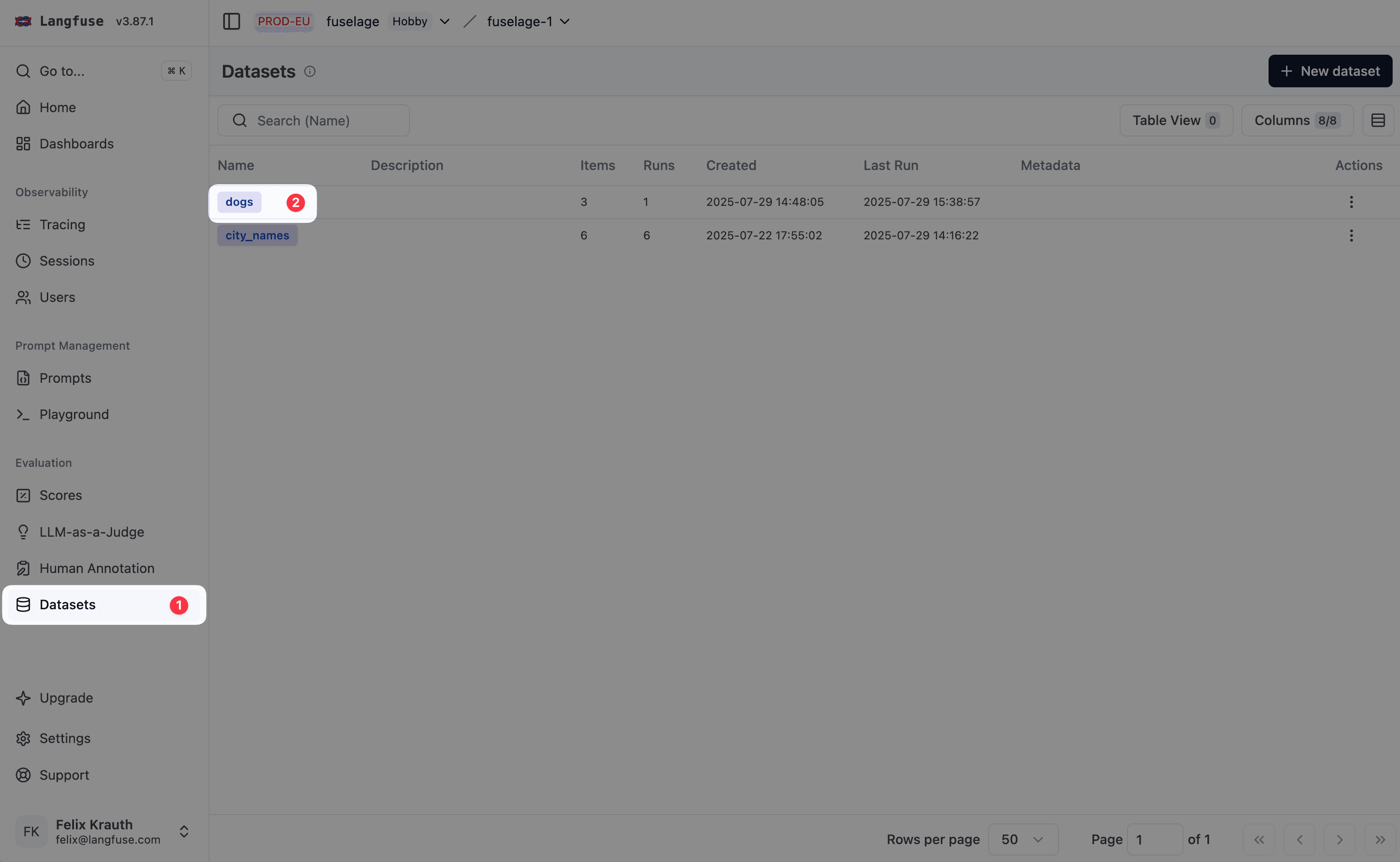
Navigate to the dataset
- Navigate to
Your Project>Datasets - Click on the dataset you want to set up a remote experiment trigger for
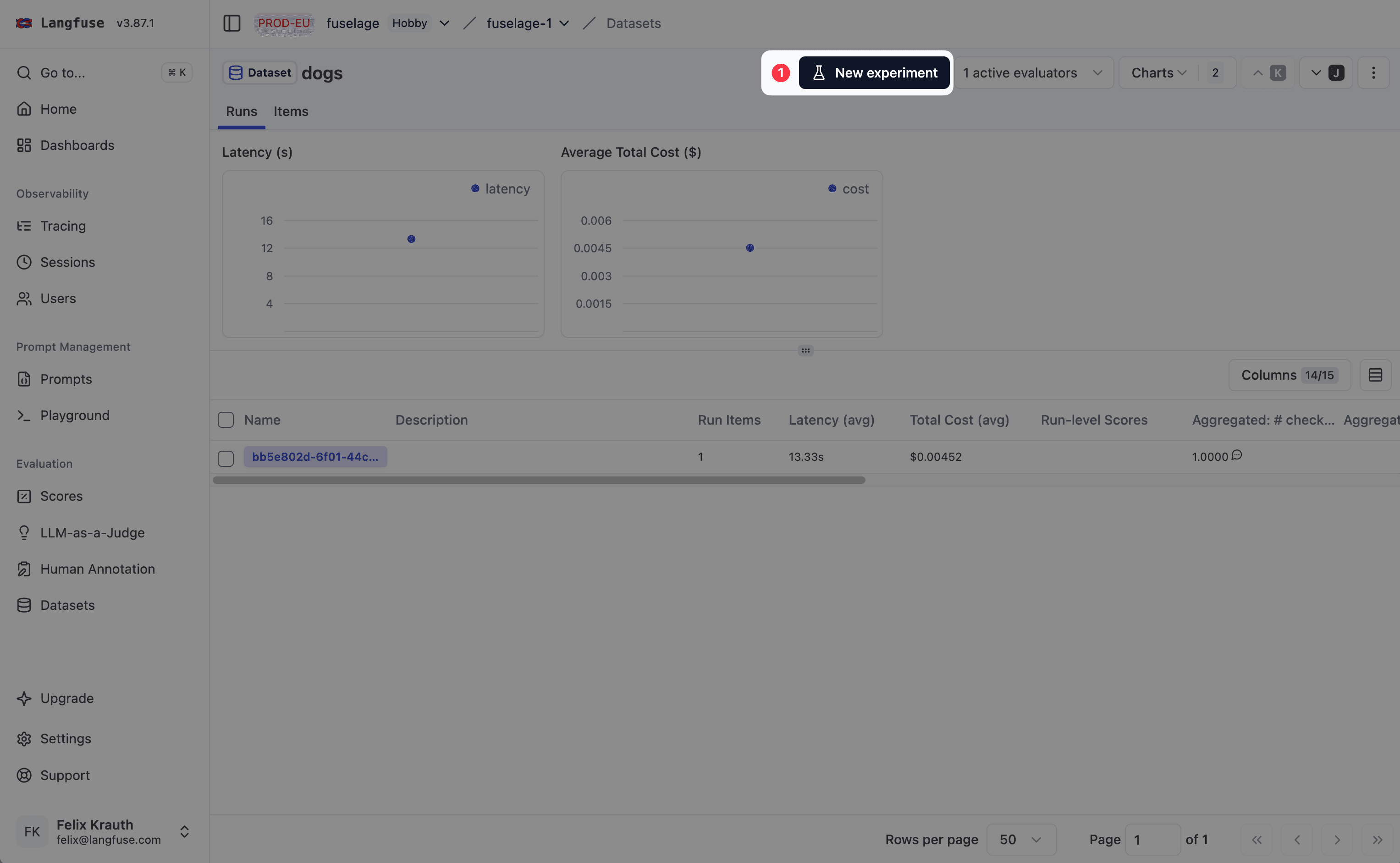
Open the setup page
Click on Start Experiment to open the setup page
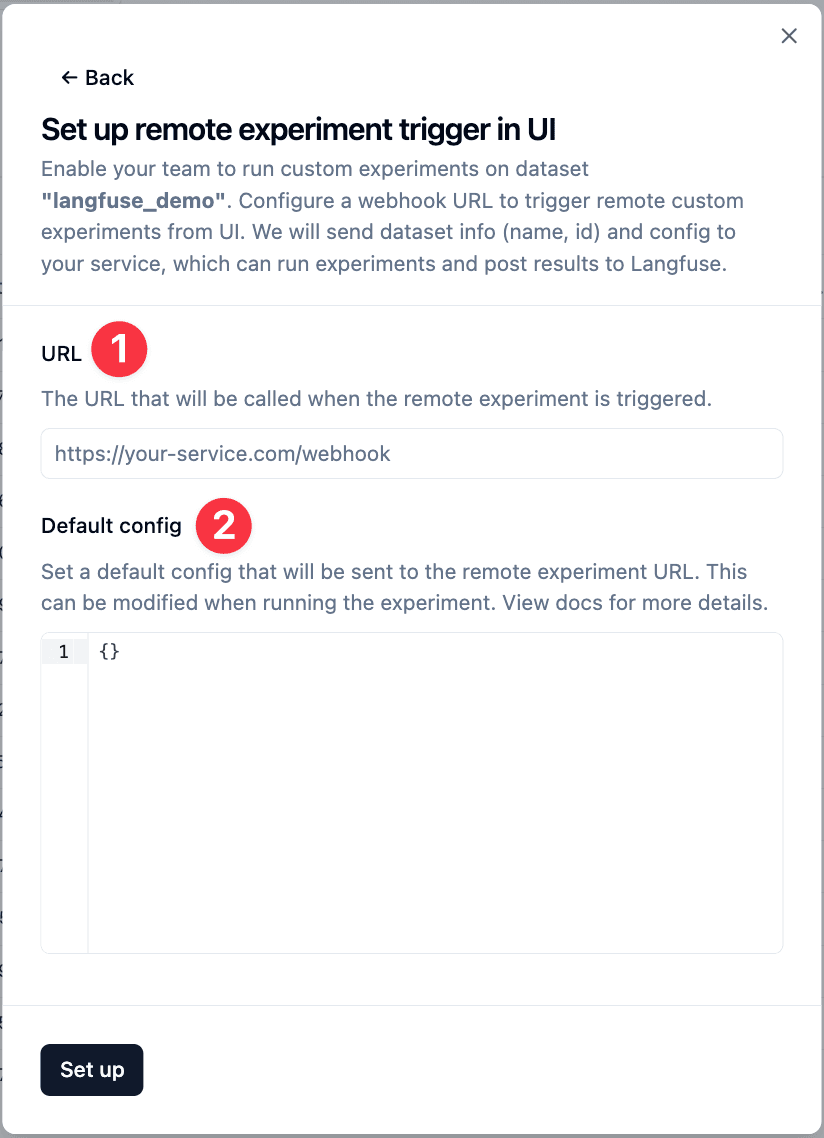
Click on ⚡ below Custom Experiment
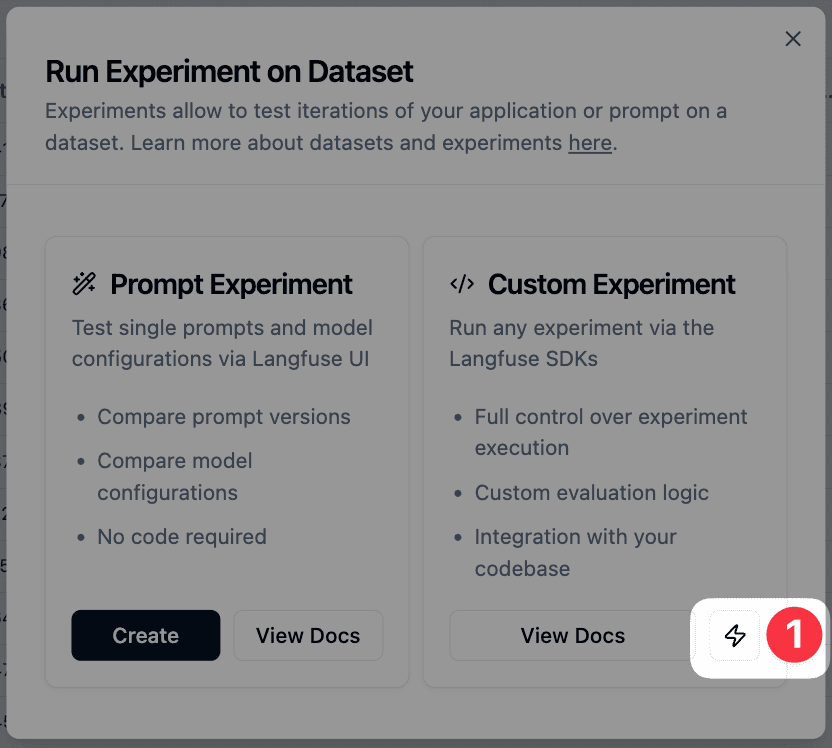
Configure the webhook
Enter the URL of your external evaluation service that will receive the webhook when experiments are triggered. Specify a default config that will be sent to your webhook. Users can modify this when triggering experiments.
Trigger experiments
Once configured, team members can trigger remote experiments via the Run button under the Custom Experiment option. Langfuse will send the dataset metadata (ID and name) along with any custom configuration to your webhook.
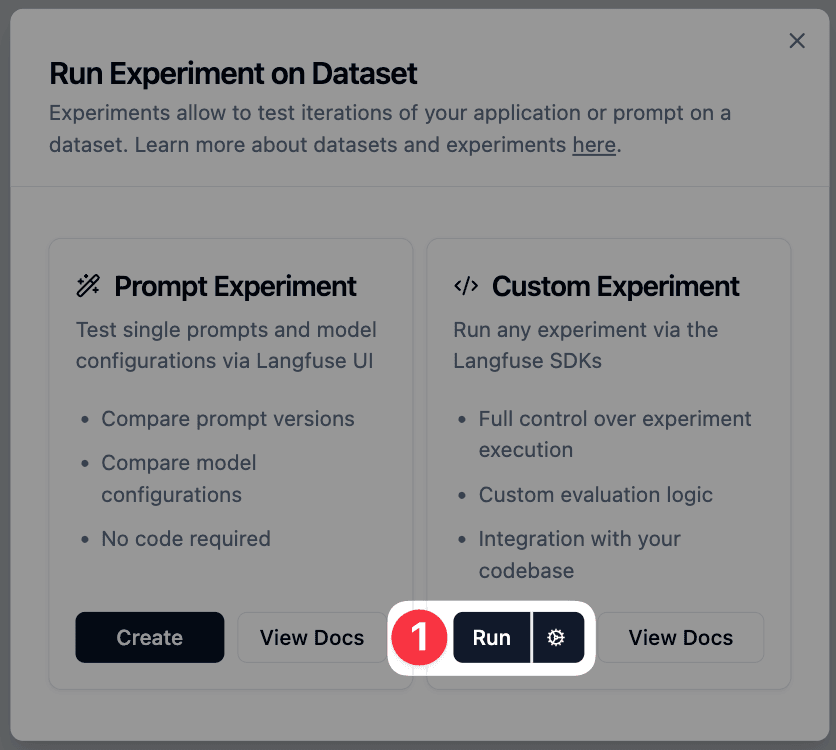
Typical workflow: Your webhook receives the request, fetches the dataset from Langfuse, runs your application against the dataset items, evaluates the results, and ingests the scores back into Langfuse as a new Experiment run.