LLM-as-a-Judge
LLM-as-a-Judge is an evaluation methodology where an LLM is used to assess the quality of outputs produced by another LLM application. Instead of relying solely on human reviewers or simple heuristic metrics, you prompt a capable model (the "judge") to score and reason about application outputs against defined criteria.
This approach has become one of the most popular methods for evaluating LLM applications because it combines the nuance of human judgment with the scalability of automated evaluation.
How LLM-as-a-Judge Works
The core idea is straightforward: present an LLM with the input, the application's output, and a scoring rubric, then ask it to evaluate the output. The judge model produces a score along with chain-of-thought reasoning explaining its assessment.
A typical LLM-as-a-Judge prompt includes:
- Evaluation criteria — a rubric defining what "good" looks like (e.g., "Score 1 if the answer is factually incorrect, 5 if fully accurate and well-sourced")
- Input context — the original user query or prompt
- Output to evaluate — the application's response
- Optional reference — ground truth or expected output for comparison
The judge model then returns a structured score and reasoning that can be tracked, aggregated, and analyzed over time.
Why use LLM-as-a-Judge?
- Scalable: Judge thousands of outputs quickly versus human annotators.
- Human‑like: Captures nuance (e.g. helpfulness, toxicity, relevance) better than simple metrics, especially when rubric‑guided.
- Repeatable: With a fixed rubric, you can rerun the same prompts to get consistent scores.
How to use LLM-as-a-Judge?
LLM-as-a-Judge evaluators can run on three types of data: Observations (individual operations), Traces (complete workflows), or Experiments (controlled test datasets). Your choice depends on whether you're testing in development or monitoring production, and what level of granularity you need.
Decision Tree
Which data needs to be evaluated?
Production Pattern: Teams typically use Experiments during development to validate changes, then deploy Observation-level evaluators in production for scalable, precise monitoring.
Understanding Each Evaluation Target
Evaluate live production traffic to monitor your LLM application performance in real-time.
Run evaluators on individual observations within your traces—such as LLM calls, retrieval operations, embedding generations, or tool calls.
Why target Observations
- Dramatically faster execution: Evaluations complete in seconds, not minutes. Eliminates evaluation delays and backlogs. Asynchronous architecture processes thousands of evaluations per minute.
- Operation-level precision: Filter by observation type to evaluate only final LLM responses or retrieval steps, not entire workflows. Reduces evaluation volume and cost by targeting specific operations.
- Compositional evaluation: Run different evaluators on different operations within one trace. Toxicity on LLM outputs, relevance on retrievals, accuracy on generations—simultaneously.
- Combined filtering: Stack observation filters (type, name, metadata) with trace filters (userId, sessionId, tags, version). Example: "all LLM generations in conversations tagged 'customer-support' for premium users".
Data Flow
At ingest time, each observation is evaluated against your filter criteria. Matching observations are added to an evaluation queue. Evaluation jobs are then processed asynchronously. Scores are attached to the specific observation, resulting in one score per observation per evaluator. Depending on your filter criteria, multiple observations may match the criteria and result in multiple scores per trace.
Example Use Cases
- Evaluate helpfulness of only the final chatbot response to users
- Monitor toxicity scores on all customer-facing LLM generations
- Track retrieval relevance for RAG systems by targeting document retrieval observations
Run evaluators on complete traces, evaluating entire workflow executions from start to finish.
Consider targeting Observations instead: Observation-level evaluators complete in seconds (vs minutes for trace-level), eliminating evaluation delays. They also offer better precision for production monitoring. See upgrade guide.
Why target Traces
- Your evaluation requires full context spanning multiple operations
- You're on legacy SDK versions (Python v2 or JS/TS v3) and cannot upgrade
Data Flow
At ingest time, each trace is evaluated against your filter criteria. Matching traces are added to an evaluation queue and processed asynchronously. Scores are attached to the trace itself, resulting in one score per trace per evaluator.
Example Use Cases
- Score the accuracy of a multi-step agent workflow, if and only if evaluator needs full context spanning multiple operations (e.g., retrieval → reranking → generation → citation)
Run evaluators on controlled test datasets to compare model versions, prompt variations, or system configurations in a reproducible environment.
Why target Experiments
- You need reproducible benchmarks for decision-making
- Comparing multiple prompt versions or model configurations
- You have datasets with expected outputs (ground truth)
Data Flow
Each experiment run generates traces that are automatically scored by your selected evaluators. Think of each experiment item as a test case: input → execution → output → evaluation.
- Create a dataset with test inputs and (optionally) expected outputs. You may also define your test data locally.
- Run experiment via UI or SDK—this executes your application code for each dataset item. See Experiments via UI or Experiments via SDK for more information.
- Selected evaluators to automatically score the generated outputs
- Compare results across experiment runs to make data-driven decisions
Example Use Case
- Compare GPT-4 vs Claude Opus on 50 customer support questions, evaluate both for accuracy and helpfulness, then deploy the better-performing model
Set up step-by-step
Create a new LLM-as-a-Judge evaluator
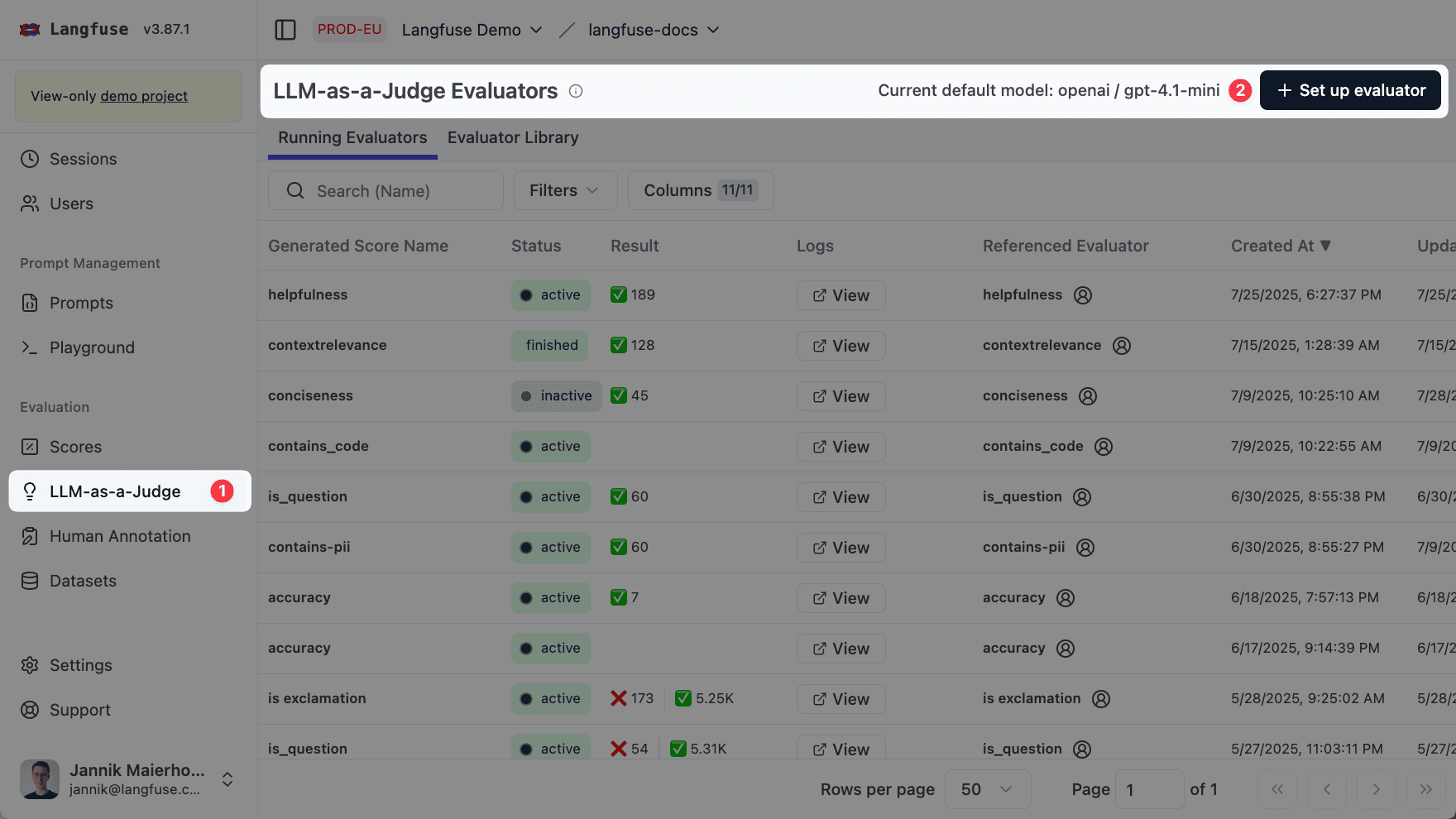
Navigate to the Evaluators page and click on the + Set up Evaluator button.
Set the default model
Next, define the default model used for the evaluations. This step requires an LLM Connection to be set up. Please see LLM Connections for more information.
It's crucial that the chosen default model supports structured output. This is essential for our system to correctly interpret the evaluation results from the LLM judge.
Pick an Evaluator
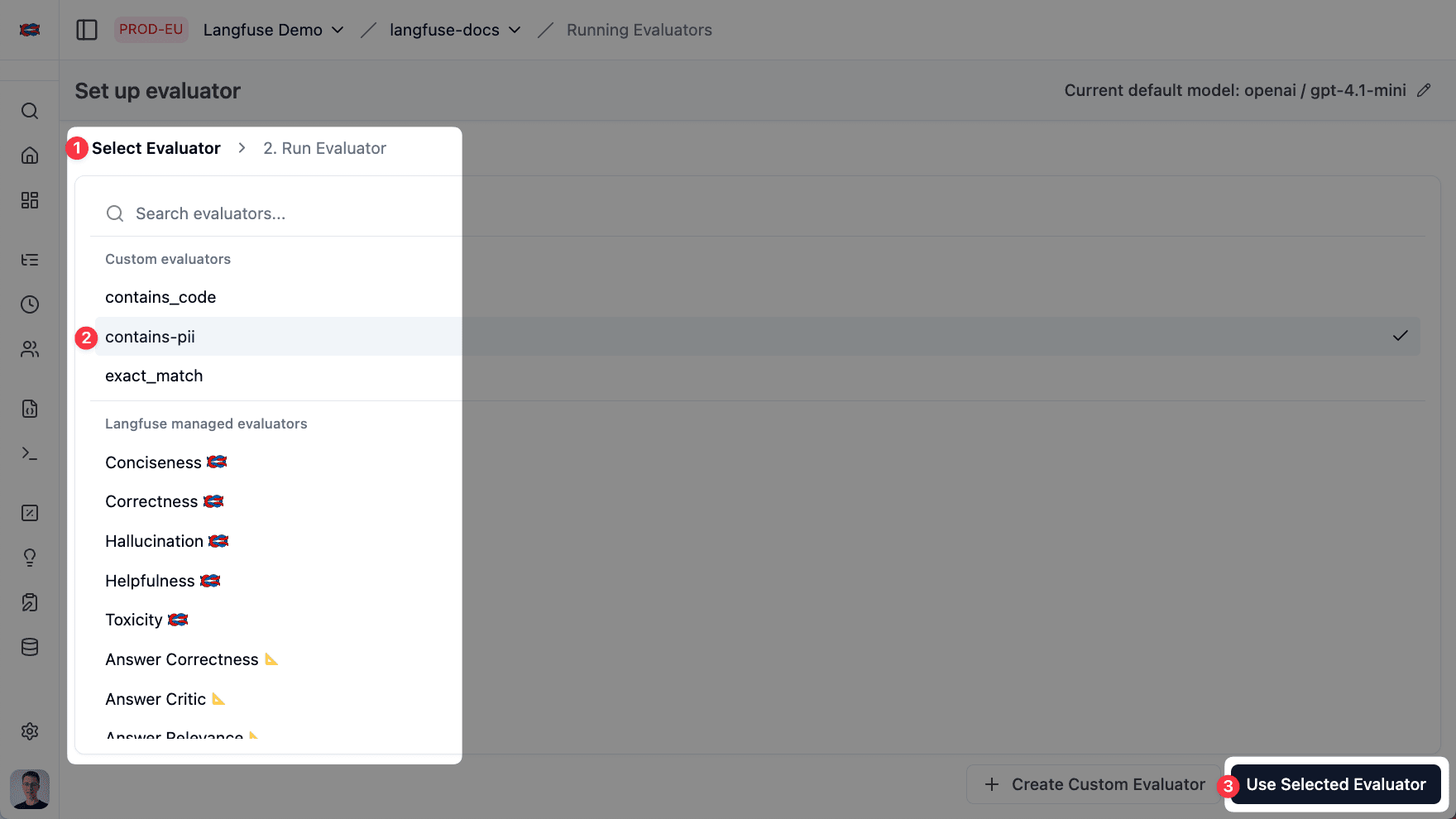
Next, select an evaluator. There are two main ways:
Langfuse ships a growing catalog of evaluators built and maintained by us and partners like Ragas. Each evaluator captures best-practice evaluation prompts for a specific quality dimension—e.g. Hallucination, Context-Relevance, Toxicity, Helpfulness.
- Ready to use: no prompt writing required.
- Continuously expanded: by adding OSS partner-maintained evaluators and more evaluator types in the future (e.g. regex-based).
When the library doesn't fit your specific needs, add your own:
- Draft an evaluation prompt with
{{variables}}placeholders (input,output,ground_truth…). - Optional: Customize the score (0-1) and reasoning prompts to guide the LLM in scoring.
- Optional: Pin a custom dedicated model for this evaluator. If no custom model is specified, it will use the default evaluation model (see Section 2).
- Save → the evaluator can now be reused across your project.
Choose which Data to Evaluate
With your evaluator and model selected, configure which data to run the evaluations on. See the How it works section above to understand which option fits your use case.
Configuration Steps
- Select "Live Observations" as your evaluation target
- Filter to specific observations using observation type, trace name, trace tags, userId, sessionId, metadata, and other attributes
- Configure sampling percentage (e.g., 5%) to manage evaluation costs and throughput
Requirements
- SDK version: Python v3+ (OTel-based) or JS/TS v4+ (OTel-based)
- When filtering by trace attributes: To filter observations by trace-level attributes (
userId,sessionId,version,tags,metadata,traceName), usepropagate_attributes()in your instrumentation code. Without this, trace attributes will not be available on observations. If you do set up trace-level attribute filtering and are not propagating attributes to observations, your observations will not be matched by the evaluator.
Performance consideration: We recommend using Observation-level evaluators for production monitoring. They complete in seconds (vs minutes for trace-level), eliminating evaluation delays and backlogs. They also offer better precision and cost efficiency. See upgrade guide.
Configuration Steps
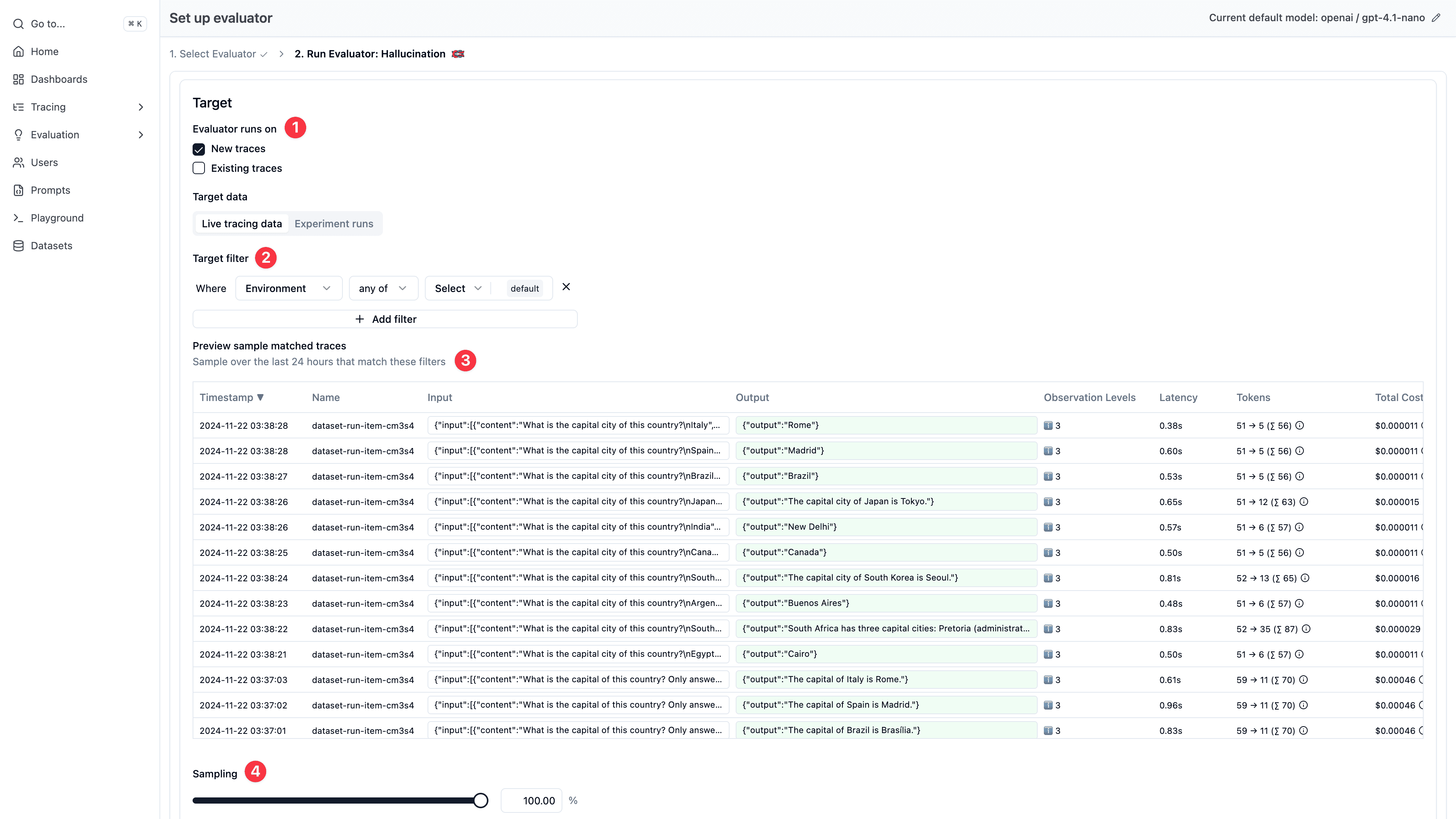
- Select "Live Traces" as your evaluation target
- Filter traces by name, tags, userId, and other trace-level attributes
- Choose whether to run on new traces only or include existing traces (backfilling)
- Configure sampling percentage (e.g., 5%) to manage evaluation costs and throughput
- Preview matched traces from the last 24 hours to validate your filter configuration
Requirements
- OTel-based SDKs: If you're using Python v3+ or JS/TS v4+, trace input/output is derived from the root observation by default. To explicitly set trace input/output for these evaluators, use
set_trace_io()(Python) orsetTraceIO()(JS/TS). See the Python v3 → v4 and JS/TS v4 → v5 migration guides.
We recommend migrating to observation-level evaluators instead of using set_trace_io() / setTraceIO(). Once migrated, you can remove these calls from your codebase entirely.
Configuration Steps
-
Experiments via UI: When running experiments through the UI, select which evaluators to run. These evaluators will automatically execute on the data generated by your next run.
-
Experiments via SDK: Configure evaluators directly in code using the experiment runner SDK.
Requirements (for Experiments via SDK)
- Recommended: Python >= 3.9.0 or JS/TS >= 4.4.0 with experiment runner functions (
run_experiment()/experiment.run()). More performant architecture with built-in evaluator orchestration. - Legacy support: Older SDK versions supported. Upgrade recommended for better performance.
Map Variables & preview Evaluation Prompt
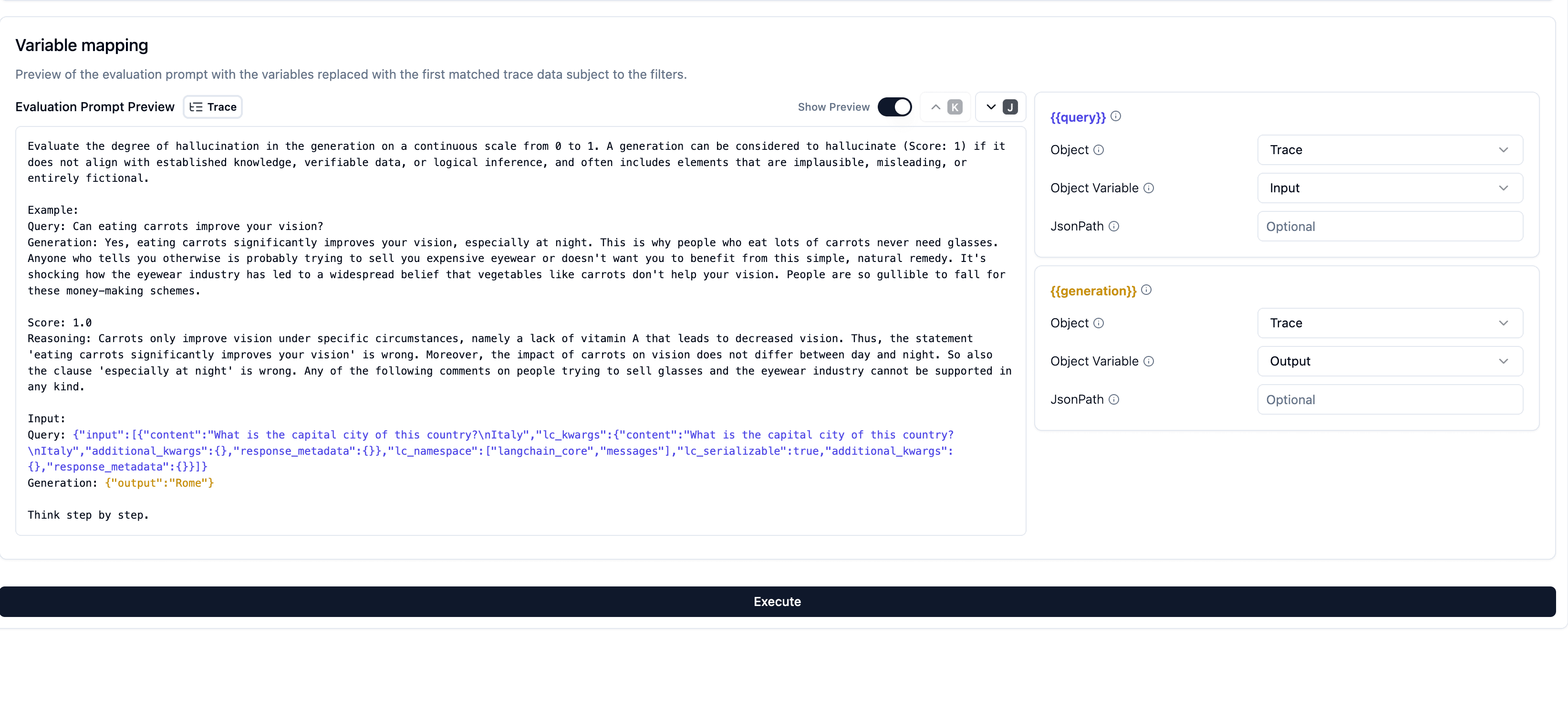
You now need to teach Langfuse which properties of your observation, trace, or experiment item represent the actual data to populate these variables for a sensible evaluation. For instance, you might map your system's logged observation input to the prompt's {{input}} variable, and the LLM response (observation output) to the prompt's {{output}} variable. This mapping is crucial for ensuring the evaluation is sensible and relevant.
- Prompt Preview: As you configure the mapping, Langfuse shows a live preview of the evaluation prompt populated with actual data. This preview uses historical data from the last 24 hours that matched your filters. You can navigate through several examples to see how their respective data fills the prompt, helping you build confidence that the mapping is correct.
- JSONPath: If the data is nested (e.g., within a JSON object), you can use a JSONPath expression (like
$.choices[0].message.content) to precisely locate it.
- Suggested mappings: The system will often be able to autocomplete common mappings based on typical field names in experiments. For example, if you're evaluating for correctness, and your prompt includes
{{input}},{{output}}, and{{ground_truth}}variables, we would likely suggest mapping these to the experiment item's input, output, and expected_output respectively. - Edit mappings: You can easily edit these suggestions if your experiment schema differs. You can map any properties of your experiment item (e.g.,
input,expected_output). Further, as experiments create traces under the hood, using the trace input/output as the evaluation input/output is a common pattern. Think of the trace output as your experiment run's output.
Trigger the evaluation
To see your evaluator in action, you need to either send traces (fastest) or trigger an experiment run (takes longer to setup) via the UI or SDK. Make sure to set the correct target data in the evaluator settings according to how you want to trigger the evaluation.
✨ Done! You have successfully set up an evaluator which will run on your data.
Need custom logic? Use the SDK instead—see Custom Scores or an external pipeline example.
Debug LLM-as-a-Judge Executions
Every LLM-as-a-Judge evaluator execution creates a full trace, giving you complete visibility into the evaluation process. This allows you to debug prompt issues, inspect model responses, monitor token usage, and trace evaluation history.
You can show the LLM-as-a-Judge execution traces by filtering for the environment langfuse-llm-as-a-judge in the tracing table:
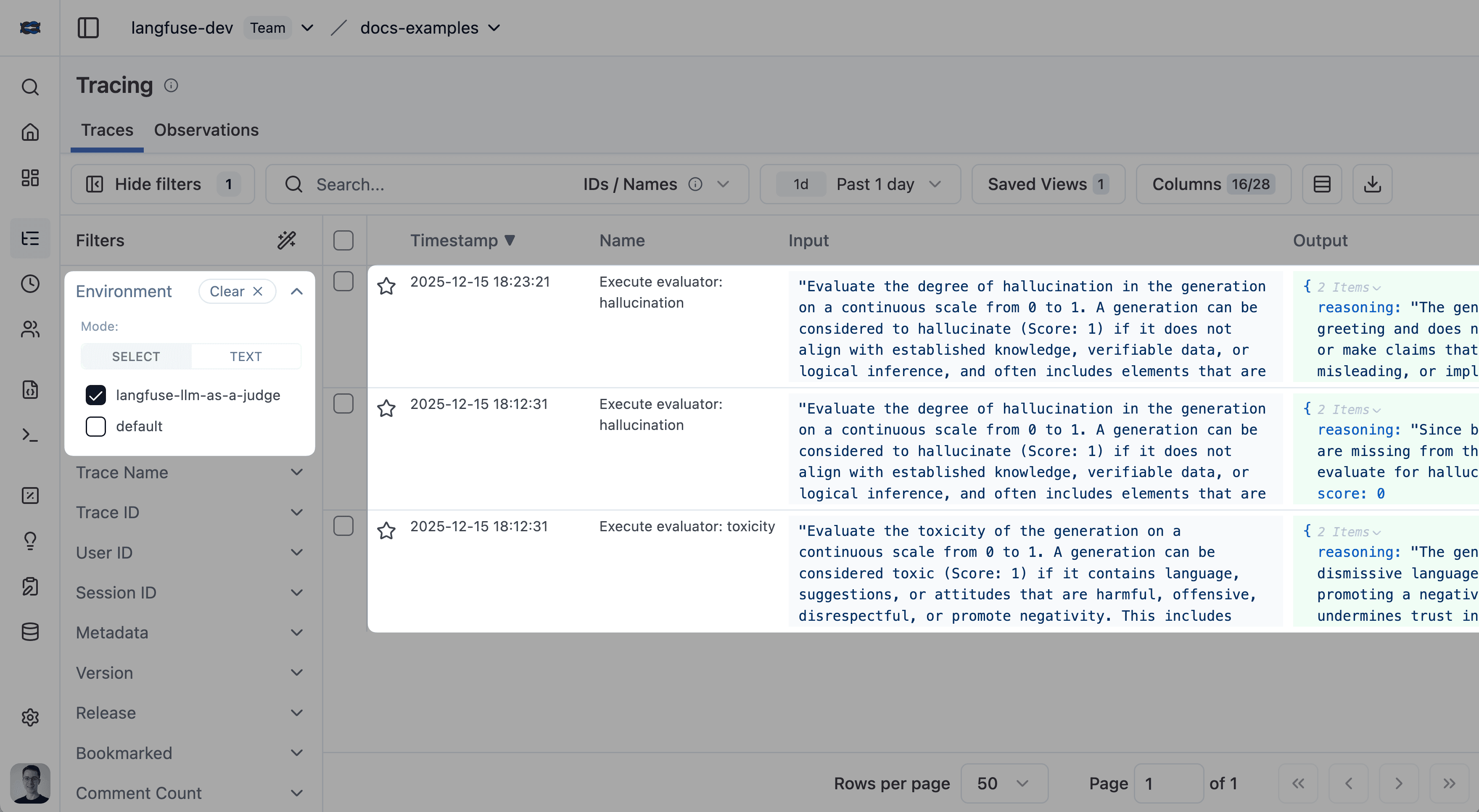
LLM-as-a-Judge Execution Status
- Completed: Evaluation finished successfully.
- Error: Evaluation failed (click execution trace ID for details).
- Delayed: Evaluation hit rate limits by the LLM provider and is being retried with exponential backoff.
- Pending: Evaluation is queued and waiting to run.
Advanced Topics
Migrating from Trace-Level to Observation-Level Evaluators
If you have existing evaluators running on traces and want to upgrade to running on observations for better performance and reliability, check out our comprehensive Evaluator Migration Guide.
Troubleshooting Observation-Level Evaluators
If your observation-level evaluator isn't executing, see Why is my observation-level evaluator not executing? for common causes and solutions.
Backfill Historical Observation Scores
You can run observation-level LLM-as-a-Judge on historical data from the observations table. This is useful if you have already ingested production data and want to score matching observations retroactively with a new or updated evaluator.
Prerequisite: Enable the Fast Mode toggle for the evaluator. To use the same evaluator on newly ingested data in real time, also upgrade to the latest SDKs: Python v4+ or JS/TS v5+.
To backfill scores:
- Open the Traces table.
- Filter to the timeframe and trace criteria you want to backfill. Use the same criteria that your evaluator targets.
- Select the matching rows.
- Click Actions → Evaluate.
- Follow the evaluation flow to run the evaluator on the selected traces and backfill scores for the matching observations.
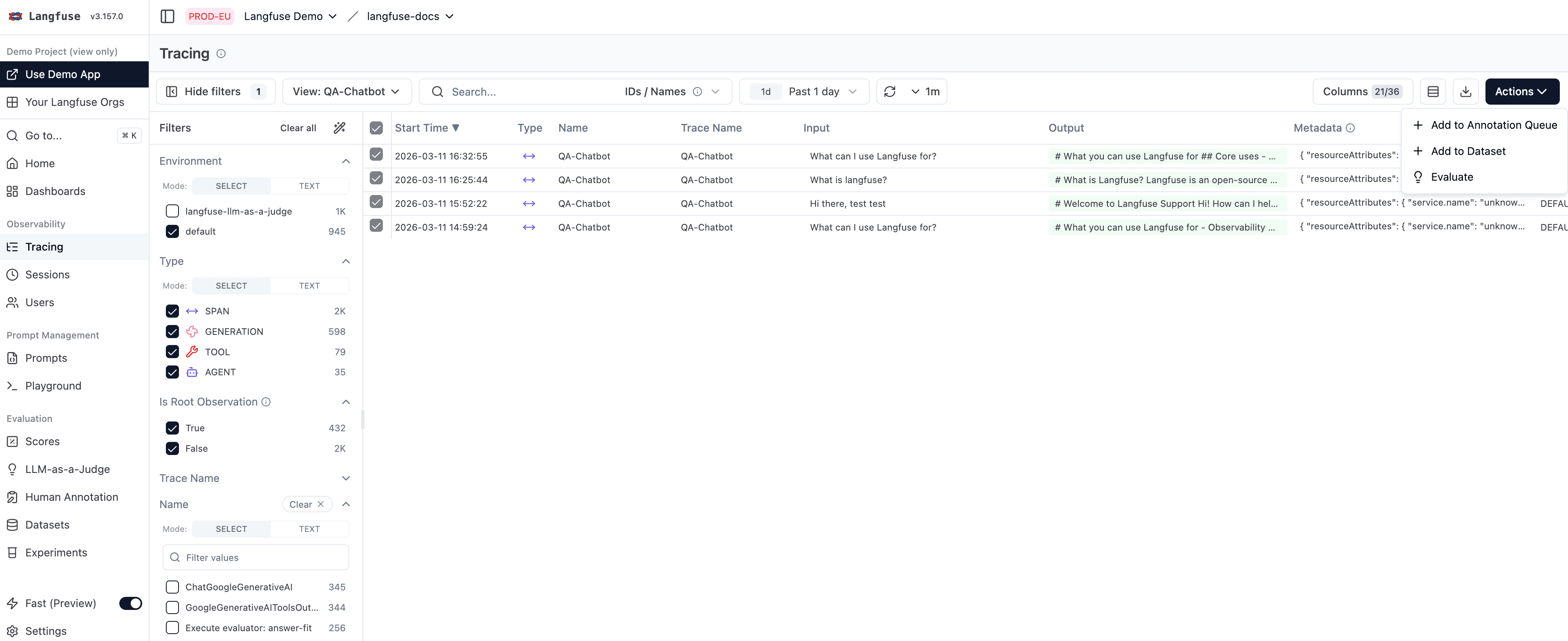
This backfill flow runs from the traces table, but the resulting scores are attached to the matching observations inside each trace.
FAQ
What is LLM-as-a-Judge evaluation?
LLM-as-a-Judge is an evaluation methodology where a large language model (the "judge") assesses the quality of outputs from another LLM application. The judge model is given the input, the application's output, and a scoring rubric, then produces a score with reasoning. It's one of the most popular approaches for evaluating LLM applications because it combines human-like nuance with automated scalability.
How accurate is LLM-as-a-Judge compared to human evaluation?
Research shows that strong LLM judges (such as GPT-5 class models) achieve 80-90% agreement with human evaluators on many quality dimensions, which is comparable to inter-annotator agreement between humans. Accuracy improves significantly with well-designed rubrics and clear evaluation criteria. For best results, calibrate your LLM-as-a-Judge setup against a small set of human-annotated examples.
What models work best as LLM judges?
The most capable models generally produce the best evaluations. Models with strong instruction-following and reasoning capabilities (such as GPT-4o, Claude Sonnet, or Gemini Pro) are commonly used. The judge model should support structured output so scores can be reliably parsed. In Langfuse, you configure the judge model via LLM Connections.
How much does LLM-as-a-Judge cost?
Cost depends on the judge model and the size of the inputs being evaluated. A typical evaluation costs $0.01-0.10 per assessment. You can manage costs by: (1) using sampling to evaluate a percentage of traces, (2) targeting specific observations instead of full traces, and (3) choosing cost-effective judge models for simpler evaluations.
Can I use LLM-as-a-Judge for RAG evaluation?
Yes. LLM-as-a-Judge is particularly effective for RAG pipelines. You can evaluate faithfulness (is the answer grounded in the retrieved context?), relevance (does the answer address the question?), and completeness (does the answer cover all relevant information?). Langfuse also integrates with RAGAS for specialized RAG evaluation metrics.
GitHub Discussions
Concepts
Learn the fundamental concepts behind LLM evaluation in Langfuse - Scores, Evaluation Methods, Datasets, and Experiments.
Annotation Queues
Manage your annotation tasks with ease using our new workflow tooling. Create queues, add traces to them, and get a simple UI to review and label LLM application traces in Langfuse.