Log Levels
Traces can have a lot of observations (data model). You can differentiate the importance of observations with the level attribute to control the verbosity of your traces and highlight errors and warnings. Available levels: DEBUG, DEFAULT, WARNING, ERROR.
In addition to the level, you can also include a statusMessage to provide additional context.
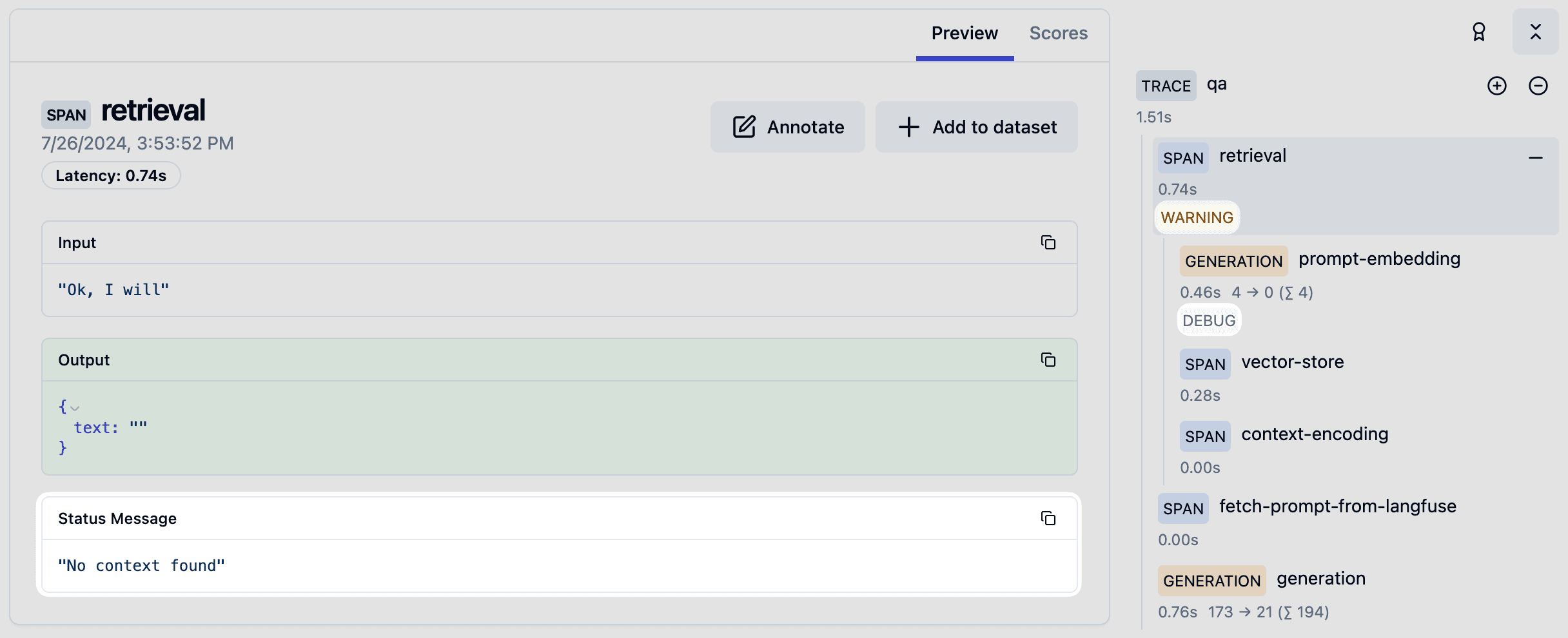
When using the @observe() decorator:
from langfuse import observe, get_client

@observe()
def my_function():
    langfuse = get_client()

    # ... processing logic ...
    # Update the current span with a warning level
    langfuse.update_current_span(
        level="WARNING",
        status_message="This is a warning"
    )
When creating spans or generations directly:
from langfuse import get_client

langfuse = get_client()

# Using context managers (recommended)
with langfuse.start_as_current_observation(as_type="span", name="my-operation") as span:
    # Set level and status message on creation
    with span.start_as_current_observation(
        name="potentially-risky-operation",
        level="WARNING",
        status_message="Operation may fail"
    ) as risky_span:
        # ... do work ...

        # Or update level and status message later
        risky_span.update(
            level="ERROR",
            status_message="Operation failed with unexpected input"
        )

# You can also update the currently active span without a direct reference
with langfuse.start_as_current_observation(as_type="span", name="another-operation"):
    # ... some processing ...
    langfuse.update_current_span(
        level="DEBUG",
        status_message="Processing intermediate results"
    )
Levels can also be set when creating generations:
langfuse = get_client()

with langfuse.start_as_current_observation(
    as_type="generation",
    name="llm-call",
    model="gpt-4o",
    level="DEFAULT"  # Default level
) as generation:
    # ... make LLM call ...

    if error_detected:
        generation.update(
            level="ERROR",
            status_message="Model returned malformed output"
        )
When using the context manager:
import { startActiveObservation, startObservation } from "@langfuse/tracing";

await startActiveObservation("context-manager", async (span) => {
  span.update({
    input: { query: "What is the capital of France?" },
  });

  updateActiveObservation({
    level: "WARNING",
    statusMessage: "This is a warning",
  });
});
When using the observe wrapper:
import { observe, updateActiveObservation } from "@langfuse/tracing";

// An existing function
async function fetchData(source: string) {
  updateActiveObservation({
    level: "WARNING",
    statusMessage: "This is a warning",
  });

  // ... logic to fetch data
  return { data: `some data from ${source}` };
}

// Wrap the function to trace it
const tracedFetchData = observe(fetchData, {
  name: "observe-wrapper",
});

const result = await tracedFetchData("API");
When creating observations manually:
import { startObservation } from "@langfuse/tracing";

const span = startObservation("manual-observation", {
  input: { query: "What is the capital of France?" },
});

span.update({
  level: "WARNING",
  statusMessage: "This is a warning",
});

span.update({ output: "Paris" }).end();
See JS/TS SDK docs for more details.
When using the OpenAI SDK Integration, level and statusMessage are automatically set based on the OpenAI API response. See example.
When using the LangChain Integration, level and statusMessage are automatically set for each step in the LangChain pipeline.
Filter Trace by Log Level
When viewing a single trace, you can filter the observations by log level.