Sessions
Many interactions with LLM applications span multiple traces and observations. Sessions in Langfuse are a special way to group these observations across traces together and see a simple session replay of the entire interaction. Get started by propagating the sessionId attribute across observations.
Propagate a sessionId across observations that span multiple traces. The sessionId can be any US-ASCII character string less than 200 characters that you use to identify the session. All observations with the same sessionId will be grouped together including their enclosing traces. If a session ID exceeds 200 characters, it will be dropped.
When using the @observe() decorator:
from langfuse import observe, propagate_attributes

@observe()
def process_request():
    # Propagate session_id to all child observations
    with propagate_attributes(session_id="your-session-id"):
        # All nested observations automatically inherit session_id
        result = process_chat_message()

        return result
When creating observations directly:
from langfuse import get_client, propagate_attributes

langfuse = get_client()

with langfuse.start_as_current_observation(
    as_type="span",
    name="process-chat-message"
) as root_span:
    # Propagate session_id to all child observations
    with propagate_attributes(session_id="chat-session-123"):
        # All observations created here automatically have session_id
        with root_span.start_as_current_observation(
            as_type="generation",
            name="generate-response",
            model="gpt-4o"
        ) as gen:
            # This generation automatically has session_id
            pass
When using the context manager:
import { startActiveObservation, propagateAttributes } from "@langfuse/tracing";

await startActiveObservation("context-manager", async (span) => {
  span.update({
    input: { query: "What is the capital of France?" },
  });

  // Propagate sessionId to all child observations
  await propagateAttributes(
    {
      sessionId: "session-123",
    },
    async () => {
      // All observations created here automatically have sessionId
      // ... your logic ...
    },
  );
});
When using the observe wrapper:
import { observe, propagateAttributes } from "@langfuse/tracing";

const processChatMessage = observe(
  async (message: string) => {
    // Propagate sessionId to all child observations
    return await propagateAttributes({ sessionId: "session-123" }, async () => {
      // All nested observations automatically inherit sessionId
      const result = await processMessage(message);
      return result;
    });
  },
  { name: "process-chat-message" },
);

const result = await processChatMessage("Hello!");
See JS/TS SDK docs for more details.
from langfuse import get_client, propagate_attributes
from langfuse.openai import openai

langfuse = get_client()

with langfuse.start_as_current_observation(as_type="span", name="openai-call"):
    # Propagate session_id to all observations including OpenAI generation
    with propagate_attributes(session_id="your-session-id"):
        completion = openai.chat.completions.create(
            name="test-chat",
            model="gpt-3.5-turbo",
            messages=[
                {"role": "system", "content": "You are a calculator."},
                {"role": "user", "content": "1 + 1 = "}
            ],
            temperature=0,
        )
from langfuse import get_client, propagate_attributes
from langfuse.langchain import CallbackHandler
langfuse = get_client()
handler = CallbackHandler()
with langfuse.start_as_current_observation(as_type="span", name="langchain-call"):
# Propagate session_id to all observations
with propagate_attributes(session_id="your-session-id"):
# Pass handler to the chain invocation
chain.invoke(
{"animal": "dog"},
config={"callbacks": [handler]},
)Use propagateAttributes() with the CallbackHandler:
import { startActiveObservation, propagateAttributes } from "@langfuse/tracing";
import { CallbackHandler } from "langfuse-langchain";

const langfuseHandler = new CallbackHandler();

await startActiveObservation("langchain-call", async () => {
  // Propagate sessionId to all observations
  await propagateAttributes(
    {
      sessionId: "your-session-id",
    },
    async () => {
      // Pass handler to the chain invocation
      await chain.invoke(
        { input: "<user_input>" },
        { callbacks: [langfuseHandler] },
      );
    },
  );
});
The Flowise Integration automatically maps the Flowise chatId to the Langfuse sessionId. Flowise 1.4.10 or higher is required.
- Values must be strings ≤200 characters
- Call early in your trace to ensure all observations are covered. This way you make sure that all Metrics in Langfuse are accurate.
- Invalid values are dropped with a warning
Example
Try this feature using the public example project.
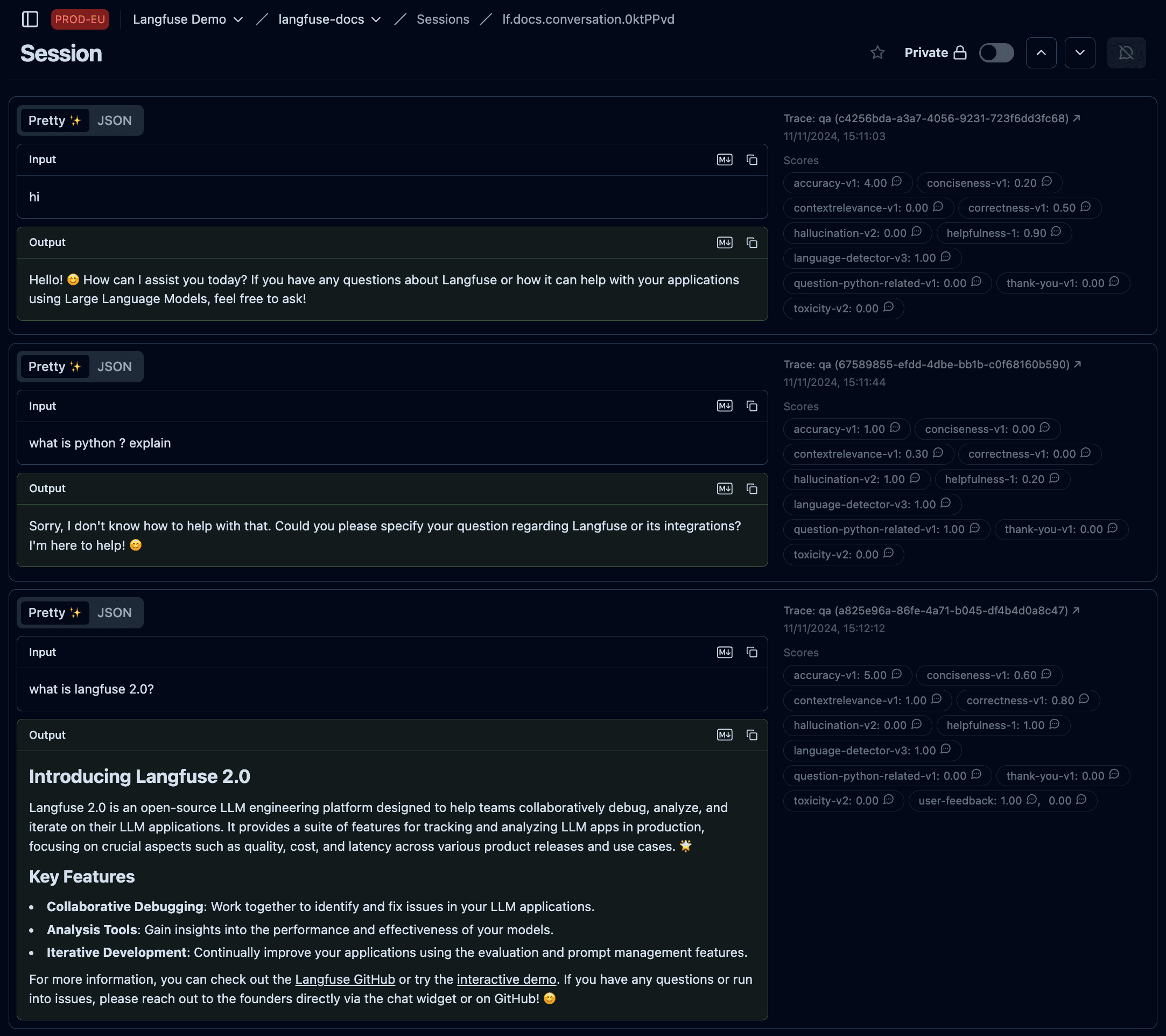
Example session spanning multiple traces
Other features
- Publish a session to share with others as a public link (example)
- Bookmark a session to easily find it later
- Annotate sessions by adding
scoresvia the Langfuse UI to record human-in-the-loop evaluations - Add
session-levelscores programmatically via SDK or API, for example from user feedback forms, moderation checks, or conversation-level QA pipelines. See Scores via API/SDK. - How to evaluate sessions in Langfuse?
Related Resources
- If you need to group operations across multiple services into a single trace (rather than grouping traces together), see Trace IDs & Distributed Tracing.