Variables in Prompts
Variables are placeholders for dynamic strings in your prompts. They allow you to create flexible prompt templates that can be customized at runtime without changing the prompt definition itself.
All prompts support variables using the {{variable}} syntax. When you fetch a prompt from Langfuse and compile it, you provide values for these variables that get inserted into the prompt template.
Get started
Create prompt with variables
When creating a prompt in the Langfuse UI, simply use double curly braces {{variable_name}} to define a variable anywhere in your prompt text.
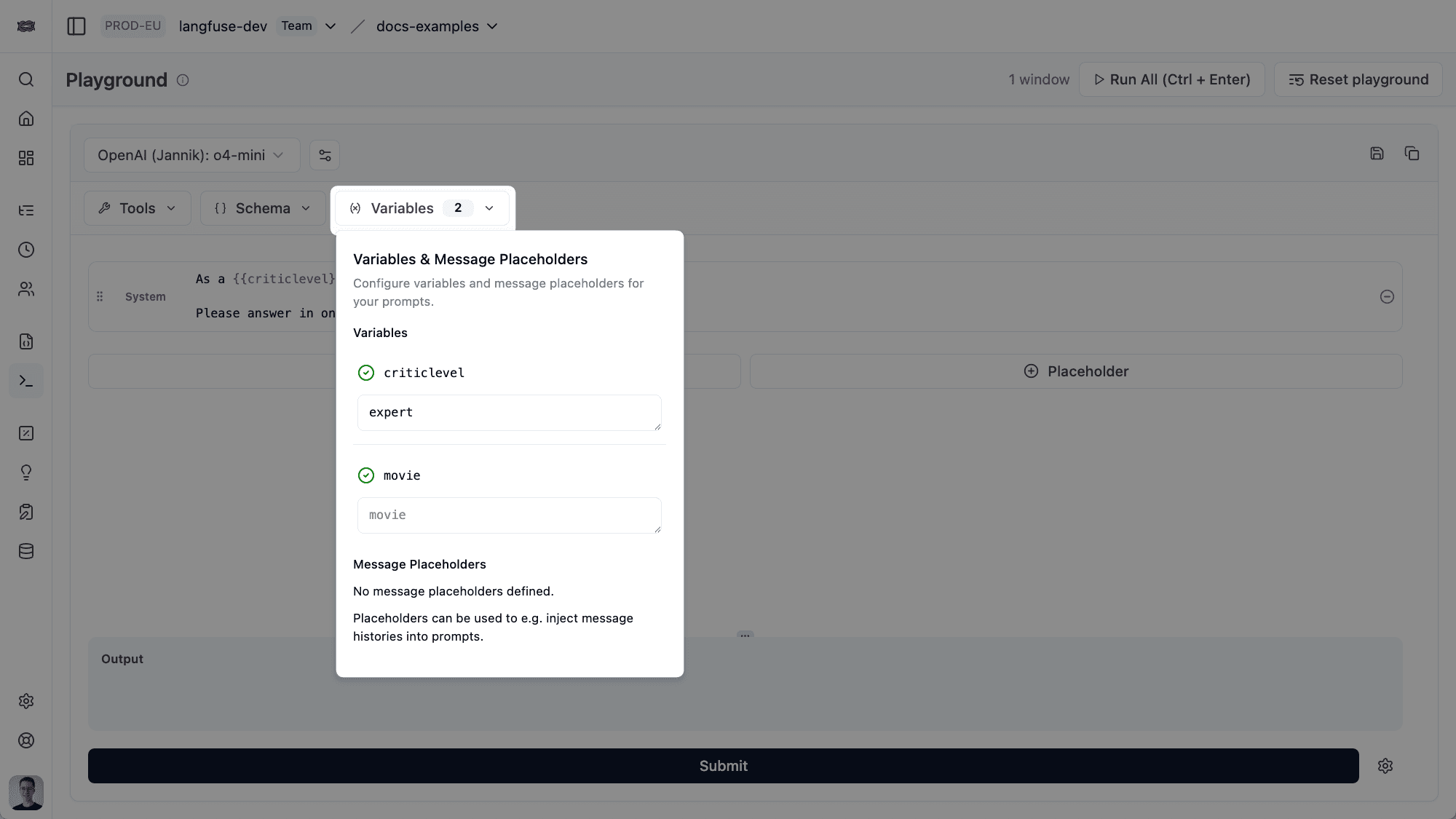
Variables work in both text prompts and chat prompts. You can use them in any message content.
from langfuse import get_client

langfuse = get_client()

# Text prompt with variables
langfuse.create_prompt(
    name="movie-critic",
    type="text",
    prompt="As a {{criticLevel}} movie critic, do you like {{movie}}?",
    labels=["production"],
)

# Chat prompt with variables
langfuse.create_prompt(
    name="movie-critic-chat",
    type="chat",
    prompt=[
        {
            "role": "system",
            "content": "You are a {{criticLevel}} movie critic."
        },
        {
            "role": "user",
            "content": "What do you think about {{movie}}?"
        }
    ],
    labels=["production"],
)
import { LangfuseClient } from "@langfuse/client";
const langfuse = new LangfuseClient();
// Text prompt with variables
await langfuse.prompt.create({
name: "movie-critic",
type: "text",
prompt: "As a {{criticLevel}} movie critic, do you like {{movie}}?",
labels: ["production"],
});
// Chat prompt with variables
await langfuse.prompt.create({
name: "movie-critic-chat",
type: "chat",
prompt: [
{
role: "system",
content: "You are a {{criticLevel}} movie critic.",
},
{
role: "user",
content: "What do you think about {{movie}}?",
},
],
labels: ["production"],
});Compile variables at runtime
In your application, use the .compile() method to replace variables with actual values. Pass the variables as keyword arguments (Python) or an object (JavaScript/TypeScript).
from langfuse import get_client

langfuse = get_client()

# Get the prompt
prompt = langfuse.get_prompt("movie-critic")

# Compile with variable values
compiled_prompt = prompt.compile(
    criticLevel="expert",
    movie="Dune 2"
)

# -> compiled_prompt = "As an expert movie critic, do you like Dune 2?"

# Use with your LLM
response = openai.chat.completions.create(
    model="gpt-4",
    messages=[{"role": "user", "content": compiled_prompt}]
)
import { LangfuseClient } from "@langfuse/client";
const langfuse = new LangfuseClient();
// Get the prompt
const prompt = await langfuse.prompt.get("movie-critic", {
type: "text",
});
// Compile with variable values
const compiledPrompt = prompt.compile({
criticLevel: "expert",
movie: "Dune 2",
});
// -> compiledPrompt = "As an expert movie critic, do you like Dune 2?"
// Use with your LLM
const response = await openai.chat.completions.create({
model: "gpt-4",
messages: [{ role: "user", content: compiledPrompt }],
});from langfuse import get_client
from langchain_core.prompts import PromptTemplate, ChatPromptTemplate
langfuse = get_client()
# For text prompts
langfuse_prompt = langfuse.get_prompt("movie-critic")
langchain_prompt = PromptTemplate.from_template(langfuse_prompt.get_langchain_prompt())
# Compile with variables
compiled = langchain_prompt.format(criticLevel="expert", movie="Dune 2")
# -> "As an expert movie critic, do you like Dune 2?"
# For chat prompts
langfuse_chat_prompt = langfuse.get_prompt("movie-critic-chat")
langchain_chat_prompt = ChatPromptTemplate.from_template(
langfuse_chat_prompt.get_langchain_prompt()
)
# Compile with variables
compiled_messages = langchain_chat_prompt.format_messages(
criticLevel="expert",
movie="Dune 2"
)import { LangfuseClient } from "@langfuse/client";
import { PromptTemplate, ChatPromptTemplate } from "@langchain/core/prompts";
const langfuse = new LangfuseClient();
// For text prompts
const langfusePrompt = await langfuse.prompt.get("movie-critic", {
type: "text",
});
const langchainPrompt = PromptTemplate.fromTemplate(
langfusePrompt.getLangchainPrompt()
);
// Compile with variables
const compiled = await langchainPrompt.format({
criticLevel: "expert",
movie: "Dune 2",
});
// -> "As an expert movie critic, do you like Dune 2?"
// For chat prompts
const langfuseChatPrompt = await langfuse.prompt.get("movie-critic-chat", {
type: "chat",
});
const langchainChatPrompt = ChatPromptTemplate.fromTemplate(
langfuseChatPrompt.getLangchainPrompt()
);
// Compile with variables
const compiledMessages = await langchainChatPrompt.formatMessages({
criticLevel: "expert",
movie: "Dune 2",
});Not exactly what you need? Consider these similar features:
- Prompt references for reusing sub-prompts
- Message placeholders for inserting arrays of complete messages instead of strings
Or related FAQ pages:
- Can I dynamically select sub-prompts at runtime?
- How can I manage my prompts with Langfuse?
- How to configure retries and timeouts when fetching prompts?
- How to measure prompt performance?
- I'm not seeing the latest version of my prompt. Why?
- Link prompt management with tracing in Langfuse
- Using external templating libraries (Jinja, Liquid, etc.) with Langfuse prompts
- What is prompt engineering?